Storage Configuration
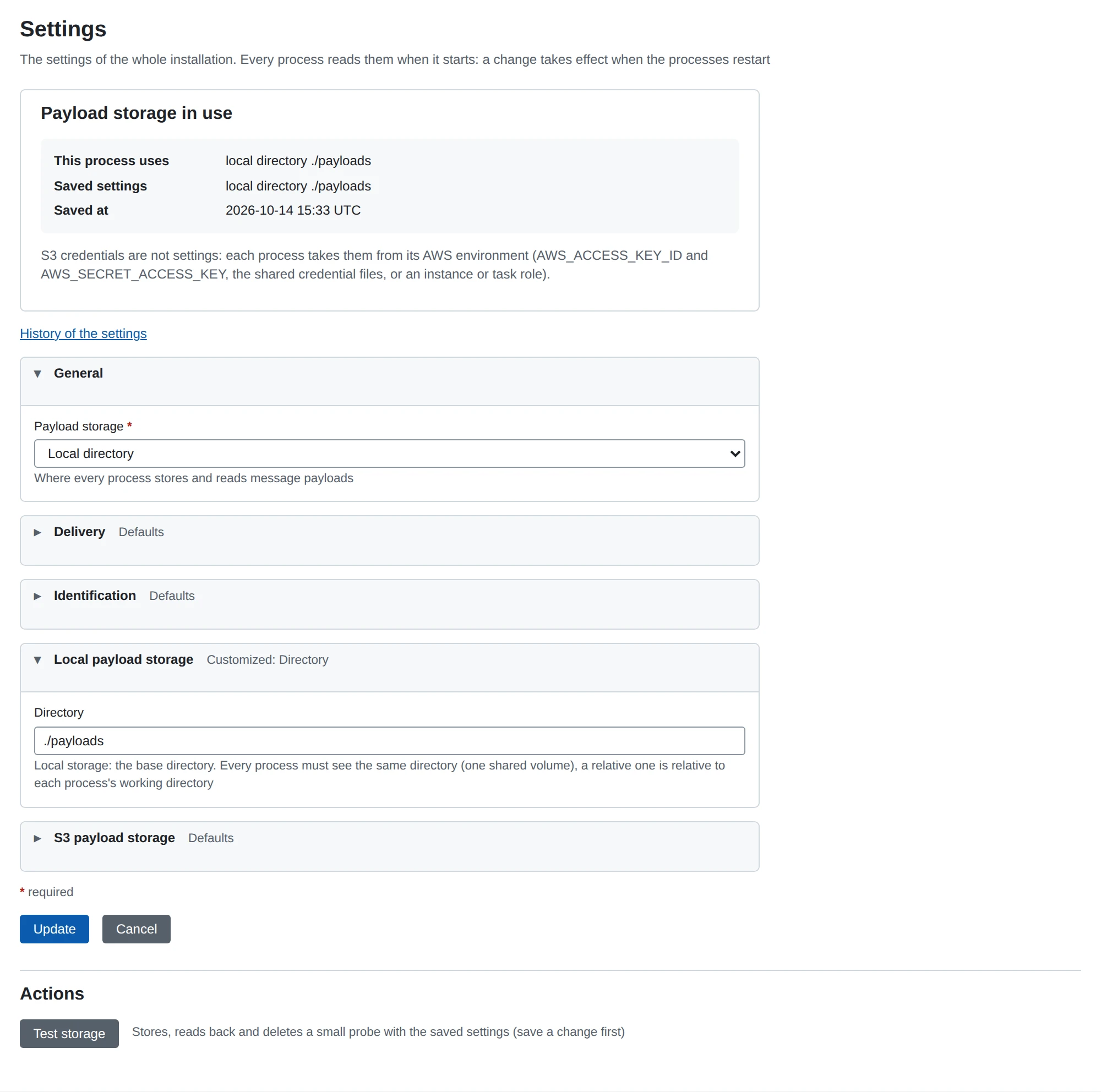
Message payloads are kept apart from message metadata. Metadata lives in the database (deployment); the bytes live in one of two payload backends, chosen by the global settings: System > Settings in the web UI, or GET/PUT /api/v1/settings in the REST API. The settings are stored in the database, so every process of a deployment reads the same ones: standalone from the database, each process of the distributed mode over the persistence process.
| Setting | JSON property | Meaning |
|---|---|---|
| Backend | storage_backend | local stores payloads in a directory, s3 in an S3 bucket |
| Directory | storage_local_directory | Base directory of local storage, required for local. A relative directory is relative to the working directory of each process |
| S3 Bucket | storage_s3_bucket | Bucket name, required for s3. The bucket must exist |
| S3 Region | storage_s3_region | AWS region, required for s3 |
| S3 Endpoint | storage_s3_endpoint | URL of an S3-compatible service (MinIO, LocalStack), empty for AWS itself. When set, path-style addressing is used |
A new database starts with local storage in ./payloads, relative to the working directory of each process.
S3 credentials are not settings and are never stored or shown: each process takes them from the AWS SDK’s default chain, AWS_ACCESS_KEY_ID / AWS_SECRET_ACCESS_KEY, a shared credentials file, or an instance/task role. Prefer a role over static keys where the platform offers one.
When a change takes effect
Every process reads the settings once, when it starts, and keeps that storage until it stops. A saved change therefore takes effect when the processes restart: restart all of them, so that none writes to the old storage while the others read from the new one. Until then the settings page shows the storage the process runs with next to the saved one and says that a restart is needed; GET /api/v1/settings says the same in storage_in_use and restart_needed.
Testing the storage
Test storage on the settings page (POST /api/v1/settings/storage/test in the REST API) stores a small probe blob with the saved settings, reads it back, compares it and deletes it, within 10 seconds, and reports which step failed and why. It tests the saved settings, not what is typed in the form, so save first. It runs in the API server’s process, with that process’s AWS credentials: in a distributed deployment the other processes must have the same.
What is stored
A message’s content is kept in up to four blobs, one per payload stage:
| Stage | Blob | Content |
|---|---|---|
unpacked | stored | The business payload with every transport layer removed (an AS2 message decrypted, verified and decompressed; a polled file as it was). This is what senders send and writers write unless configured otherwise |
received | stored | The request body as it arrived on the wire, before anything was done to it |
headers | stored | The request’s header block as it arrived |
message | composed | headers followed by received: the whole message as received. It exists when both parts do and is not stored separately |
receipt | stored | The receipt exchanged for the message as it traveled: for AS2 the MDN (ours for a message we received, the partner’s for one we sent), its HTTP header block, a blank line and the body. A file writer or HTTP poster cannot be configured to hand it on: it is recorded after the message was dispatched |
Every stored stage is recorded in the message_payloads table (message id, stage, size). Readers go by that record, not by looking into storage: a stage without a record does not exist for the message, and asking for it fails with the message has no "<stage>" payload (it has: ...). Every blob of a message is a stage: a protocol keeps nothing of its own next to them.
Key layout
| Backend | Key of a blob |
|---|---|
| Local | <directory>/<message id>/<stage> |
| S3 | messages/<message id>/<stage> in the bucket |
Directories are created on demand. Nothing in the database holds a storage key, so a backend’s layout is its own business.
Choosing a backend
- Local is the default. In distributed mode every process that stores or reads payloads must see the same directory: mount one shared volume at the configured directory in all of them (the Compose file mounts its
payloadsvolume at/opt/microb2b/payloads, which its fixture’s./payloadsnames, see deployment). - S3 keeps payloads off the hosts’ disks and needs no shared volume: give every process the same AWS credentials.
Local files are only as safe as the disk: back up the directory together with the database and monitor free space. For S3, restrict the bucket with a policy and enable encryption and versioning as your policy requires.
S3-compatible services
MinIO and LocalStack work through the endpoint setting:
curl -X PUT http://localhost:8080/api/v1/settings \
  -H 'Authorization: Bearer <token>' -H 'Content-Type: application/json' \
  -d '{"storage_backend": "s3", "storage_s3_bucket": "microb2b-payloads",
       "storage_s3_region": "us-east-1", "storage_s3_endpoint": "http://minio:9000"}'
and in the environment of every process:
AWS_ACCESS_KEY_ID=minioadmin
AWS_SECRET_ACCESS_KEY=minioadmin
The bucket must exist; MicroB2B does not create it (for MinIO, mc mb local/microb2b-payloads). For LocalStack use the endpoint http://localstack:4566 and any credentials.
Changing backends
There is no migration tool. Copy the blobs so that the layout of the new backend is met: strip or add the messages/ prefix, for example aws s3 sync ./payloads/ s3://microb2b-payloads/messages/ from local to S3. The message_payloads records need no change because they name stages, not keys. Save the new settings, stop all processes, copy, then start them again.
Errors
Storage errors are wrapped with their cause: failed to store blob to S3, failed to retrieve blob from S3, failed to read blob data from S3. A local failure carries the operating system’s error (a missing directory permission, a full disk). A process whose storage settings cannot be read or are incomplete does not start (failed to initialize payload storage). See troubleshooting.