Deployment
MicroB2B runs in one of two modes. Both are the same binary, microb2b, with a different subcommand.
| Standalone | Distributed | |
|---|---|---|
| Command | microb2b standalone | microb2b --nats <url> <command>, one per component |
| Message bus | Embedded NATS server, in process only (it listens on no port) | External NATS server |
| Database | SQLite (default) or PostgreSQL, opened by the process | PostgreSQL, opened by the persistence process only |
| Payload storage | Local directory or S3 | Local directory ./payloads shared by all processes |
| Plugins | All configured instances, in the process | One instance per process |
Start with standalone. The quick start walks through it.
Build variants and authentication
There are two builds of the same code, selected when the binary is compiled (the Go build tag developer), not by any environment variable, flag, setting or request:
| Release build | Developer build | |
|---|---|---|
| Made by | just build-release, just container-release, go build ./cmd/microb2b | just build, just container, go build -tags developer ./cmd/microb2b |
| Web UI | Sign-in required: MicroB2B’s users with a password and an authenticator app, and the users of the OpenID Connect identity providers configured in the web UI (see Authentication) | The same login page, plus a Sign in as developer button that anybody can press; every page shows the banner Developer build: anybody can sign in as the developer and a startup warning is logged |
| REST API | The access tokens of an enabled identity provider; without one every request is refused | Every request is accepted, as the user developer, without a token |
| Required configuration | PUBLIC_URL, SESSION_KEY | None: PUBLIC_URL and SESSION_KEY are optional (identity providers are offered only with PUBLIC_URL) |
| API server listens on | Every interface, port HTTP_PORT | Loopback only (127.0.0.1, and ::1 where the host has it), port HTTP_PORT, unless DEVELOPER_LISTEN_ADDRESS names another address (see Developer listen address) |
--reset-db, --fixtures | Do not exist | Exist |
| Use | Anything that is reachable by someone else | Your own machine, tests, CI, the development compose stack |
MicroB2B has no authorization yet: whoever is signed in is an administrator.
A release build fails closed: the API server refuses to start, and the process exits with an error naming each problem, unless PUBLIC_URL and SESSION_KEY are set and valid. An identity provider that cannot be reached does not stop it. No environment variable, flag or request turns authentication off in a release build. go test ./cmd/microb2b builds both binaries and fails if the release one contains any developer code or starts without authentication configured.
Developer listen address
In the developer build anybody can sign in as the developer and the REST API accepts every request, so its API server (web UI and REST API) listens on loopback only: localhost:8080 works on the machine itself, and no other machine on the network reaches it. DEVELOPER_LISTEN_ADDRESS opens it to one other address: an IP address such as 192.168.1.20, or 0.0.0.0 (or ::) for every interface. A value that is not an IP address stops startup with an error naming the variable, and a set value is logged as a warning at startup. Only the developer build reads the variable; a release build listens on every interface and does not have it.
Inside a container, loopback is the container’s own, so a published port would reach nothing: the compose stack sets DEVELOPER_LISTEN_ADDRESS=0.0.0.0 for its apiserver and publishes the port on the host’s 127.0.0.1 only.
This is the API server’s address alone. An AS2 receiver listens on the Bind address and Port of its own instance configuration in both builds (default 0.0.0.0, every interface), because partners must reach it.
Authentication
Every user of the web UI signs in, and in a release build every client of the REST API is authenticated. There is no authorization yet: everybody who signs in is an administrator. There is one login, /ui/login, with every way in at once; nothing chooses between them:
| Way in | Available | Who | Where users are managed |
|---|---|---|---|
| Password | Always | MicroB2B’s own users whose password login is on: a password and a code of an authenticator app (TOTP) or a recovery code | microb2b users on the command line and System > Users in the web UI |
| OpenID Connect | For each enabled identity provider configured in the web UI or REST API, when PUBLIC_URL is set | Users of external identity providers (Keycloak, JumpCloud, …), any number of them; the page shows a Sign in with <display name> button per provider beside the password form. The first login of an identity creates its MicroB2B user | Who may sign in: at the identity provider. The providers: System > Users > Identity providers. Their user records: System > Users |
| Developer button | Developer build only | Anybody, as the user developer | - |
Every way in signs in a user record of MicroB2B (the table users; in distributed mode the API server reaches it over the persistence process like every other record), so System > Users lists everybody who ever signed in, a user is disabled or signed out the same way however they sign in, and the audit log names every actor by their user name.
The sign-in settings are environment variables of the API server process (the only process in standalone mode); the other processes of a distributed deployment do not read them, except that microb2b users reads PUBLIC_URL. The identity providers are records in the database, edited in the web UI or the REST API (see OpenID Connect).
Sign-in settings
| Variable | Default | Meaning |
|---|---|---|
PUBLIC_URL | required in a release build | The address users reach MicroB2B at, such as https://b2b.example.com (no path). https is required in a release build, except for localhost, 127.0.0.1 and ::1; a developer build, served over plain http, also takes http on any host. An identity provider’s redirect URI is <PUBLIC_URL>/ui/auth/<provider name>/callback; a setup link is <PUBLIC_URL>/ui/setup/<token>. A developer build without it shows and prints setup links as paths and offers no identity provider. |
SESSION_KEY or SESSION_KEY_FILE | one required in a release build | Key material for the session cookies: base64 or hex of at least 32 random bytes. A developer build without it seals its cookies with a fixed developer key, so its sessions outlive a restart. |
SESSION_TTL | 8h | How long a login lasts, from 5 minutes to 72 hours (a Go duration). |
Generate a session key, and keep it secret and stable (changing it signs everybody out; every instance behind a load balancer needs the same one):
openssl rand -base64 32Startup validates every variable and reports all problems at once, each naming its variable (never a secret). Secrets are never logged. A release build without identity providers and without any user starts: its login page shows the password form alone, and the first user is created on the command line (see Users).
The login needs SECRETS_KEY (see Secrets), which the API server needs anyway: each user’s authenticator secret and each identity provider’s client secret are sealed with it, re-sealed by microb2b secrets rekey and part of the startup key check.
Users
Every user is an administrator. A user has:
- A name of 1 to 64 characters: lower case letters, digits,
.,_,-and@, starting with a letter or digit, and a display name, shown in the page header. - Password login, on or off. A user created with
microb2b users createor on System > Users has it on; a user the identity provider created and the developer user have it off. With it on, the user signs in with a password and a code once both are set. - An identity at the identity provider (issuer and subject), for a user the provider created. Nothing else links a user to the provider.
With password login on:
- Passwords are at least 12 characters and at most 256 bytes. A password is refused when it is on a built-in list of common passwords, contains the user’s name, display name or
microb2b, or is too repetitive. There are no composition rules and no expiry (NIST SP 800-63B). Passwords are stored as argon2id hashes (64 MiB, 3 passes, 4 lanes). - An authenticator app is required: TOTP of RFC 6238 (SHA-1, 6 digits, 30 seconds, one step of clock difference either way), each code accepted once. Setting it up shows a QR code and the key to type in, and asks for a code from the app before it is kept. The user then gets 10 single-use recovery codes (
abcde-fghij), shown once and stored hashed; one can be typed instead of a code at login, when the phone is lost. - Login asks for the name and password, then for a code from the authenticator app or a recovery code. Whatever was wrong (the name, the password, the code, an account that cannot sign in with a password), the answer is the same.
There is no default user and no default password. A user is created without a password and gets a one-time setup link, <PUBLIC_URL>/ui/setup/<token>, valid for 24 hours and used once, where they choose a password and set up their authenticator app. Hand the link over yourself: MicroB2B sends no e-mail and has no “forgot password”. The token is stored hashed, and setup paths are left out of the access log and of traces. The setup link of a user whose password login is off does not open.
The first user of an installation is created on the command line, before or after MicroB2B is started:
PUBLIC_URL=https://b2b.example.com DB_URL=file:/var/lib/microb2b/microb2b.db \
  microb2b users create admin --display-name "Ada Admin"
It prints the setup link; open it in the browser and complete it. From then on that user creates the others and adds the identity providers in the web UI; the users of a provider are created by their first sign-in there.
Managing users
microb2b users works without a web session and without a running API server. It opens the database itself with DB_TYPE and DB_URL (creating the tables when MicroB2B never started on that database), or, with the global --nats <url> flag, goes through the persistence process of a distributed deployment. It needs no SECRETS_KEY. It prints whole setup links when PUBLIC_URL is set, and otherwise the path with a hint to put the public address in front of it.
| Command | Does |
|---|---|
microb2b users create <name> [--display-name <text>] | Creates a user with password login on and prints the setup link |
microb2b users list | Name, display name, enabled, password set, TOTP set, open setup link, last login |
microb2b users reset-password <name> | Removes the password and prints a new setup link; the authenticator app stays |
microb2b users reset-totp <name> | Removes the authenticator app and the recovery codes and prints a new setup link; the password stays |
microb2b users reset <name> | Both, and prints a new setup link |
microb2b users password-login <name> on|off [--force] | Turns the user’s password login on (printing a setup link when the user has no password or no authenticator yet) or off (ending their sessions) |
microb2b users disable <name> [--force] | The user can no longer sign in, in any way |
microb2b users enable <name> | The user can sign in again |
microb2b users delete <name> [--yes] [--force] | Deletes the user; asks for confirmation unless --yes |
microb2b users sign-out <name> | Ends every session of the user |
A reset is refused for a user whose password login is off (turn it on instead). Disabling or deleting the last user who can sign in (enabled, with password login on or an identity at the provider), or turning password login off for that user, is refused unless --force is given, so an installation is not left without anyone who can sign in by accident. Every change is an audit event of kind user, by the actor cli:<operating system user>.
The web UI has the same under System > Users (/ui/users, in every build): create a user (the setup link is shown once), list (with a Sign-in column: Password, Identity provider or both), change a display name, turn password login on (a setup link is shown once when one is needed) or off, reset the password, the authenticator or both (shown with password login on; a new setup link is shown once), disable and enable, sign out everywhere, and delete in the danger zone of the user’s page. The user’s page shows whether password login is on and the user’s identity at the provider (<subject> at <issuer>). Each user’s own page is the name in the page header (/ui/account): with password login on, change the password (asks for the current one), replace the authenticator app (the current password and a code from the new app; gives new recovery codes) and make new recovery codes (the current password); without it, the page says the user signs in at the identity provider. Changing one’s password or authenticator ends one’s other sessions and renews the current one.
When a reset keeps one credential, the setup link asks for it before anything is changed: after reset-password a current code of the authenticator app (or a recovery code), after reset-totp the password. A link alone is then not enough to take over the account.
Creating, changing (display name, enabled, password login, password, authenticator, a reset, a sign-out) and deleting users are audit events of kind user, with credential changes recorded as secret changes without values; a user the identity provider creates at a first login is an audit event too, by the actor system. Logins and failed logins are log lines carrying the user attribute, not audit events.
Using an identity provider and passwords together
Both ways work at once and each user has the ones that suit them. A common setup: everyday users sign in at the identity provider, and one administrator keeps password login on as a break-glass account for when the provider is down or misconfigured. Keep that account’s password and recovery codes somewhere safe and offline. An identity provider user can also be given password login (System > Users, Turn password login on, then the setup link), and a password user cannot be linked to an identity at the provider: the provider creates its own user at the first login.
Recovery
- A user lost their phone: they sign in with a recovery code and replace the authenticator on their account page. Without recovery codes, another user (or the CLI) runs a TOTP reset and hands over the new setup link, which asks for the password.
- A user forgot their password: another user (or the CLI) resets the password; the setup link asks for a code of the user’s authenticator app.
- Nobody can sign in (the only administrator is locked out, every user is disabled, or the identity provider is gone): on the server, with the database variables,
microb2b users reset <name>,enable <name>,password-login <name> on(for a user of the identity provider) orcreate <name>for a new user, then open the printed link. Access to the server and its database is the last way in.
Throttling
Failed password logins are slowed down, in memory, per API server process: per account name, 3 failures are free and each further one makes the next attempt wait 1 s, 2 s, 4 s and so on up to 15 minutes; per client address, 20 failures are free, then the same. While a wait lasts the login is answered 429 with Retry-After. It is a growing delay, never a lock, so a user is never locked out for good and there is no unlock command: once the wait has passed the next attempt is taken. A successful login resets the account’s count, and a restart of the API server resets every count. Behind a reverse proxy every client has the proxy’s address, so the per-address limit applies to all of them together. The identity provider throttles its own logins.
Sessions
Every way in ends in the same session: one encrypted, tamper-proof cookie (AES-256-GCM, HttpOnly, SameSite=Lax), holding the user name, the user’s session generation, how the session began and when it ends. It is checked against the user on every request: a user who was deleted or disabled, or whose session generation changed, is sent to the login. So disabling a user, any reset, a password or authenticator change, turning password login off and “sign out everywhere” end that user’s sessions at once, however they began, a stolen cookie included. When the session ends (SESSION_TTL) the user signs in again. Logging out clears the cookie in the browser (and, for a session the identity provider began, ends the provider’s session, see Logout); it ends no other session. Rotating SESSION_KEY ends every session. CSRF protection stays on every state-changing page.
A release build names its cookies __Host-mb2b_session, __Host-mb2b_login (a password login in progress) and __Host-mb2b_oidc (a login at the identity provider in progress), all Secure: they need MicroB2B served over https from the root of its host name, normally behind a reverse proxy; http://localhost:8080 works for a trial on the same machine. A developer build, which is served over plain http, also to other machines, names them mb2b_session, mb2b_login and mb2b_oidc, without Secure.
REST API
- Release build with an enabled identity provider:
Authorization: Bearer <access token>, a JWT issued by any enabled provider (see OpenID Connect). The token’s issuer chooses the provider whose keys and API audience it is checked with. The caller is the MicroB2B user of the token’s identity (issuer andsub) when there is one, and the audit log names that user; a disabled user’s token is refused with401INVALID_TOKEN. Any other valid token (a machine client of the client credentials grant) is its subject, which is what the audit log names. - Release build without an enabled identity provider: every
/api/v1request is answered401with codeUNSUPPORTED_AUTHENTICATION. Password users have no API credentials yet; use the web UI, or add an identity provider for machine clients. So the first provider of a release build is added in the web UI (see Adding a provider). - Developer build: every request is accepted, as the user
developer, with no token.
A session cookie is not accepted on the API and a bearer token is not accepted on the UI. /health stays public.
OpenID Connect
Users of external OpenID Connect (OIDC) identity providers (IdPs), for example Keycloak or JumpCloud, sign in at their IdP, and clients of the REST API present its access tokens. Who may sign in is decided at the IdP (assign the application to the right users or groups there). MicroB2B keeps a user record for each identity that signed in, but no password, refresh token or server-side session of theirs.
The providers are records, configured in the web UI (System > Users, the Identity providers button, /ui/oidc-providers) or the REST API (/api/v1/oidc-providers), not in the environment: there can be any number of them, side by side.
- Web UI: each enabled provider is a Sign in with <display name> button on the login page, beside the password form. It starts the authorization code flow with PKCE (S256),
stateandnonce. After the IdP has authenticated the user, the ID token is verified, and the ID token and access token of the login are dropped. When the session ends the login is silent while the IdP session lasts. - The user record: the first login of an identity creates a MicroB2B user, enabled, with password login off. The identity is matched by issuer and subject (
sub) only, never by a name or an e-mail address, so a name at an IdP cannot take over an existing MicroB2B user, and the same person at two providers is two users. The new user’s name is thepreferred_usernameclaim, else the part of theemailbefore the@, elseuser, in lower case with every character a user name cannot hold made-; when that name is taken,-2,-3and so on is added. Its display name is thename, else thepreferred_username, else the e-mail. Later logins of the identity are that user, whatever the claims say then. A disabled user is refused at the callback (403, “Your account is disabled in MicroB2B.”). A user of an IdP has no second factor in MicroB2B: the IdP enforces its own. - REST API:
Authorization: Bearer <access token>, a JWT issued by an enabled provider (machine clients use the client credentials grant). Itsissclaim chooses the provider with that issuer URL, and the token is validated locally against that provider’s published keys: signature,iss,aud(the provider’s API audience),exp,nbf. The IdP must issue JWT access tokens (opaque tokens are not supported). A token is answered401withMISSING_AUTH_HEADER,INVALID_AUTH_HEADER,INVALID_TOKEN(never saying why; also for a token of an issuer no enabled provider has) orTOKEN_EXPIRED, withWWW-Authenticate: Bearer.
Provider settings
| Field | Default | Meaning |
|---|---|---|
| Name | required | Lower case letters, digits, _ and -, unique. It is part of the provider’s URLs: the redirect URI <PUBLIC_URL>/ui/auth/<name>/callback and the button’s /ui/auth/<name>/start. Changing it changes the redirect URI, which must then be registered at the IdP again. |
| Display Name | required | What the button says: Sign in with <display name>. |
| Enabled | on | A disabled provider is not offered on the login page, and its access tokens are refused. Its users stay. |
| Issuer URL | required | The issuer of the IdP, exactly as in its discovery document (<issuer>/.well-known/openid-configuration), trailing slash included when it has one. https; http only for localhost, 127.0.0.1 and ::1. Unique: the issuer and a token’s subject identify a user. |
| Client ID | required | Client id of MicroB2B at the IdP. MicroB2B is a confidential client. |
| Client Secret | required when the provider is created | The client secret. Write-only: never shown or returned, kept when a later change leaves it empty, and asked for again when the issuer URL changes (it is bound to the issuer it is sent to). Stored sealed with SECRETS_KEY (see Secrets), so microb2b secrets rekey re-seals it and the startup key check covers it. |
| Scopes | openid profile email | Scopes requested at login, separated by spaces; must include openid. |
| API Audience | the client id | The audience (aud) an API access token of this provider must carry. |
The list (/ui/oidc-providers) shows each provider’s redirect URI, ready to copy into the IdP. It warns when PUBLIC_URL is not set: the redirect URIs are made of it, so without it no provider is offered on the login page (a developer build without PUBLIC_URL has no OpenID Connect login). A provider is deleted in the danger zone of its page; its users stay and can no longer sign in at it (give one password login, or delete them on System > Users). Creating, changing and deleting a provider are audit events of kind oidc-provider, the client secret recorded as a secret change without its values.
A change counts from the next sign-in, without a restart. The login reads the enabled providers on every use. A provider’s discovery document and keys are fetched when it is first used, kept while its record is unchanged, and fetched again after the record changes. Its signing keys are cached and fetched again, at most every 10 seconds, when a token is signed with a key that is not cached yet (key rotation).
A provider that cannot be reached does not stop MicroB2B. When its discovery fails (the IdP is down, the issuer URL does not match its discovery document, it does not support PKCE with S256, the client secret cannot be opened), a warning Identity provider cannot be used naming the provider is logged, its button answers 502 “The identity provider cannot be reached. Please try again in a moment.”, and the password login and the other providers work on. The provider is tried again on a use 30 seconds later or after its record is saved.
Adding a provider
Register MicroB2B at the IdP as a confidential client (authorization code flow with PKCE S256) with the redirect URI
<PUBLIC_URL>/ui/auth/<name>/callback,<name>being the name you give the provider in MicroB2B. See Keycloak and JumpCloud.In MicroB2B, System > Users, Identity providers, New identity provider: name, display name, issuer URL, client id and client secret. Or over REST:
curl -X POST -H "Authorization: Bearer $TOKEN" -H "Content-Type: application/json" \
  -d '{"name":"keycloak","display_name":"Company login","enabled":true,
       "issuer_url":"https://keycloak.example.com/realms/b2b",
       "client_id":"microb2b","client_secret":"..."}' \
  https://b2b.example.com/api/v1/oidc-providers
Sign out and use the new Sign in with <display name> button. The first login creates the user.
A new release build has neither users nor providers, and its REST API refuses every request until a provider is enabled. So create the first user on the command line (microb2b users create, see Users), sign in with its password and authenticator app, and add the provider in the web UI. Keep that user’s password login on as the break-glass account.
Several providers work side by side: each has its own button, redirect URI and users, and each one’s access tokens are accepted on the REST API (issuer URLs are unique, so a token’s issuer names exactly one). A partner portal at one IdP and the staff at another, or a move from one IdP to the next, are two providers enabled at once.
Session lifetime and logout
Choose a SESSION_TTL that suits your risk. A session an IdP began is checked against its MicroB2B user like any other (see Sessions), so disabling the user or signing them out everywhere ends it at once; disabling the user at the IdP alone does not end a MicroB2B session before it expires.
Logout ends the MicroB2B session alone. POST /ui/logout (the Logout button) clears the cookie and goes to the login page. A session at the identity provider is the provider’s and is left alone, so “Sign in with” signs the user in again without asking while that session lasts; to end it, sign out at the provider.
Keycloak
- In the realm, create a client: client type OpenID Connect, client id
microb2b. - Capability config: Client authentication: On (a confidential client), Standard flow on, direct access grants, implicit flow and service accounts off for this client.
- Access settings: Valid redirect URIs
https://b2b.example.com/ui/auth/keycloak/callback(the provider’s name in MicroB2B iskeycloakhere). Leave web origins empty. - Advanced, advanced settings: set Proof Key for Code Exchange Code Challenge Method to
S256. - Credentials: copy the client secret.
- In MicroB2B, a new identity provider: name
keycloak, issuer URLhttps://keycloak.example.com/realms/<realm>(older Quarkus-less Keycloak:https://keycloak.example.com/auth/realms/<realm>), client idmicrob2b, the client secret.PUBLIC_URL=https://b2b.example.comin the environment. - Who may sign in: every user of the realm may, unless you restrict the client (for example with an authentication flow condition on a group or role). There is no authorization inside MicroB2B.
API clients: create a second client (for example importer) with Client authentication on and Service accounts roles on, standard flow off. Keycloak does not put the id of the client in the audience of its access tokens by default, so add an Audience mapper to the service client (client, Client scopes, dedicated scope, Add mapper, By configuration, Audience) with Included Custom Audience microb2b-api and Add to access token on, and set the provider’s API Audience to microb2b-api. Then:
TOKEN=$(curl -s -d grant_type=client_credentials -d client_id=importer -d client_secret=... \
  https://keycloak.example.com/realms/<realm>/protocol/openid-connect/token | jq -r .access_token)
curl -H "Authorization: Bearer $TOKEN" https://b2b.example.com/api/v1/stats
JumpCloud
Not verified against a JumpCloud tenant (the Keycloak setup is, by test/oidc/keycloak-check.sh): the menu names and values below follow what JumpCloud documents for custom OIDC applications and may differ in your console version. Anything that speaks standard OpenID Connect with JWT access tokens works the same way.
- Admin console, SSO applications, Add New Application, Custom OIDC App.
- Redirect URIs:
https://b2b.example.com/ui/auth/jumpcloud/callback(the provider’s name in MicroB2B isjumpcloudhere). Client authentication type: Client Secret Basic or Client Secret Post (both work). Scopes:openid,profile,email. - Save, then copy the Client ID and Client Secret into a new identity provider in MicroB2B named
jumpcloud, with issuer URLhttps://oauth.id.jumpcloud.com/(with the trailing slash, as in its discovery document). - Assign the application to the user groups that may sign in to MicroB2B.
- Machine clients: JumpCloud’s access tokens are JWTs; use the client credentials grant of an application that allows it and set the provider’s API Audience to the
audof those tokens (decode one to check; by default the client id of the application that requested it, which is also MicroB2B’s default when the same client is used).
Checking a setup
test/oidc/keycloak-check.sh starts a Keycloak in docker, imports a small realm (test/oidc/realm-microb2b.json), starts a developer build, configures the provider through its REST API (which needs no token in a developer build) and drives login (which creates the user) and logout like a browser would, then starts the release build on the same database and checks its Secure login cookie and API calls with a client credentials token. It is opt-in (just test-keycloak) and not part of go test.
Behind a reverse proxy
A release build needs one (see HTTP, TLS and CORS):
- Terminate TLS at the proxy and set
PUBLIC_URLto the address users type,https://.... MicroB2B builds the identity providers’ redirect URIs and its setup links from it alone; it does not readHost,X-Forwarded-ProtoorX-Forwarded-Host. - The cookies of a release build are
Secureand named__Host-...: browsers only keep them over https (or for localhost) and when they are served from the root of the host name. MicroB2B cannot be served under a path prefix. - Pass
Cookie,Set-CookieandLocationunchanged and do not cache/ui/login,/ui/setup/*or/ui/auth/*. - The login throttle’s per-address limit counts every client behind the proxy as one address (see Throttling), and the proxy’s own access log holds the setup paths MicroB2B leaves out of its own: keep it from logging them, or keep that log as private as the links.
- With identity providers, keep the redirect URI registered at each IdP in step with
PUBLIC_URL(the list of providers shows each redirect URI); the IdP rejects an unregistered redirect URI before MicroB2B sees anything. - Several instances behind one address need the same
SESSION_KEY. The throttle is per instance.
Standalone mode
DB_URL=file:/var/lib/microb2b/microb2b.db \
  microb2b standalone
Where payloads are stored is not an environment variable but a global setting in the database (System > Settings, PUT /api/v1/settings): a new database stores them in ./payloads, relative to the working directory. Change it there (to /var/lib/microb2b/payloads, say) and restart; see storage.
The one process runs:
- the API server (web UI, REST API,
/health) onHTTP_PORT, default 8080, on every interface (the developer build: loopback, see Developer listen address); - every enabled plugin instance stored in the database (AS2 receivers listen on the Bind address and Port of their own configuration, not on
HTTP_PORT), plus the certificate monitor.
Plugin instances are read at startup, so changing them in the UI or the API takes effect after the instance restarts. Routes, certificates, organizations, partners and AS2 profiles are read when a message is handled or dispatched.
standalone has two flags, --reset-db and --fixtures <file>, which exist only in the developer build; see Build variants and Development flags.
Startup checks
Startup is refused, with the reason logged, when SECRETS_KEY is missing (a release build), wrong, or not the key the database is sealed under (see Secrets), when HTTP_PORT is not a port number, when DB_TYPE is neither sqlite3 nor postgres, or when a DB_MAX_*/DB_CONN_* value is invalid. Startup also fails when the database cannot be opened, when the payload storage settings cannot be read, and when the API port is in use (failed to start apiserver plugin: listen tcp :8080: bind: address already in use). A receiver whose port is taken does not stop startup: it logs AS2 receiver HTTP server error with the bind error and the other plugins run on, so check the log after changing a receiver’s port. One warning is logged without stopping: ALLOWED_ORIGINS=*. A release build also refuses to start when PUBLIC_URL or SESSION_KEY is missing or invalid. An identity provider that cannot be reached does not stop startup: its sign-in button answers 502 until it can be.
Shutdown
SIGINT and SIGTERM start a graceful shutdown with a 30 second limit: plugins stop (open web UI streams end at once, other in-flight requests finish), then the NATS server and the database connection close. Delivery targets (AS2 sender, file writer, HTTP poster) first stop taking new deliveries; the attempts already running get 5 seconds to finish and are then canceled. A delivery a stop interrupts is not failed: it goes back to queued (nothing was sent) or to retrying, due at once (an AS2 partner that received the message answers the repeat with its stored receipt), and the next start of the target takes it up. A process killed without a stop leaves its deliveries delivering until their lease ends, when the sweep makes them retrying. The log ends with Shutdown complete.
systemd
[Service]
User=microb2b
WorkingDirectory=/var/lib/microb2b
EnvironmentFile=/etc/microb2b.env
ExecStart=/usr/local/bin/microb2b standalone
Restart=on-failure
/etc/microb2b.env holds DB_URL and the other variables, one NAME=value per line. Logs go to the journal (standard error).
Container
The Dockerfile is an Ubuntu 24.04 image with the binary as the entrypoint (/bin/microb2b) and /opt/microb2b as the working directory. The process runs as the unprivileged user microb2b (uid/gid 10001), who owns /opt/microb2b, including its payloads directory (./payloads, the payload directory of a new database); the image contains no fixture or test key (docker-compose.yml mounts test/data/fixture.yaml into the persistence container). Payload files and the SQLite database are created readable by their owner only. just container cross-builds the Linux developer binary (anybody can sign in as the developer) and runs buildx build --tag microb2b:latest target; just container-release builds the release image, microb2b:release. The CI workflow publishes the release image to the Gitea registry for main and v* tags.
docker run -d --name microb2b \
  -p 127.0.0.1:8080:8080 -p 8081:8081 \
  -e DEVELOPER_LISTEN_ADDRESS=0.0.0.0 \
  -e DB_URL=file:/opt/microb2b/data/microb2b.db \
  -v microb2b-data:/opt/microb2b/data \
  -v microb2b-payloads:/opt/microb2b/payloads \
  microb2b:latest standalone
microb2b:latest is the developer build: its API server listens on the container’s loopback unless DEVELOPER_LISTEN_ADDRESS=0.0.0.0, and the API port is published on the host’s loopback only, because anybody can sign in to it as the developer. The release image (microb2b:release) listens on every interface without that variable (which it does not read) and needs the authentication variables instead (PUBLIC_URL, SESSION_KEY); identity providers are added in the web UI. The first user is created in the running container, which has the database variables already: docker exec microb2b /bin/microb2b users create admin. Mount the directory that holds the SQLite file, not the file: SQLite keeps -wal and -shm files next to it. Publish a port for every receiver instance (8081 above), and mount every directory a file poller or writer uses. Payloads default to ./payloads, which is /opt/microb2b/payloads there.
Database
DB_TYPE | DB_URL | |
|---|---|---|
sqlite3 (default) | file:microb2b.db (relative to the working directory) | SQLite, one connection, fine for a single process |
postgres | postgres://user:password@host:5432/db?sslmode=require | needed for distributed mode |
Missing tables are created from the models at every start. There are no migrations and existing tables are never altered: a release that changes the schema needs an empty database.
A new database starts with a working setup. When the database is created (it has no global settings yet, which are written with it and never deleted), it is seeded once with the local organization local (no AS2 local profile), the instances as2_receiver_default, as2_sender_default, file_poller_default (base directory data/outbox, path pattern {to}/{filename}) and file_writer_default (base directory data/inbox, file name pattern {from}/{original_filename}), and two routes from any party to any party: the receiver to the writer and the poller to the sender. The directories are relative to the working directory of the process that runs the instance. Creating a partner creates no directory; the poller creates its base directory when it starts and the writer creates its own when it writes. A later start never seeds again, so what you delete stays deleted. In the distributed mode the persistence process seeds. A developer build started with --fixtures loads the fixture instead of seeding.
SQLite. Every connection runs in WAL mode with a 5 second busy timeout and synchronous=FULL, so another process (the sqlite3 shell, a backup script) can read while MicroB2B writes. A pragma set in DB_URL itself wins over the value MicroB2B sets for that pragma only. In-memory databases are not put in WAL mode. Startup fails if the file system cannot do WAL (some network mounts). just sql and just list-messages open target/microb2b.db for the development run.
PostgreSQL. The pool is per process:
| Variable | Default | Meaning |
|---|---|---|
DB_MAX_OPEN_CONNS | 25 | Open connections; 0 is unlimited |
DB_MAX_IDLE_CONNS | 10 | Idle connections kept; must not exceed DB_MAX_OPEN_CONNS when that is above 0 |
DB_CONN_MAX_LIFETIME | 30m | Maximum age of a connection (a Go duration; 0 is forever) |
DB_CONN_MAX_IDLE_TIME | 5m | How long a connection may idle before it is closed (0 is forever) |
SQLite ignores them (a note is logged if they are set). A bad value stops startup with an error naming the variable. The effective values are logged as database pool configured. Keep the number of processes times DB_MAX_OPEN_CONNS below PostgreSQL’s max_connections.
Development flags
--reset-db drops and recreates every table from the current models, and --fixtures <file> loads a YAML fixture such as test/data/fixture.yaml. Both destroy data and exist only for local work, so they are compiled into the developer build only (go build -tags developer, which just build and just run use); a release binary does not contain them and rejects them as unknown flags. just run uses both against target/. Never use them on a database you want to keep.
Distributed mode
Every component is its own process, started with the NATS address as the only command-line setting (credentials and TLS are environment variables, because arguments show in the process list and in docker inspect):
microb2b --nats nats://nats:4222 persistence
microb2b --nats nats://nats:4222 apiserver
microb2b --nats nats://nats:4222 as2-receiver <instance name>
microb2b --nats nats://nats:4222 as2-sender <instance name>
microb2b --nats nats://nats:4222 file-poller <instance name>
microb2b --nats nats://nats:4222 file-writer <instance name>
microb2b --nats nats://nats:4222 http-poster <instance name>
microb2b --nats nats://nats:4222 notification-webhook <instance name>
microb2b --nats nats://nats:4222 certificate-monitor| Process | Does | Needs |
|---|---|---|
persistence | The only process that opens the database. Creates the tables and serves every other process’s database calls over NATS | DB_TYPE=postgres, DB_URL, pool variables |
apiserver | Web UI, REST API, /health, log tail | HTTP_PORT, ALLOWED_ORIGINS, PUBLIC_URL, SESSION_*, SECRETS_KEY |
as2-receiver, as2-sender, http-poster, notification-webhook | One plugin instance, named on the command line, with the settings stored under that name | SECRETS_KEY (they open the secrets and private keys they use) |
file-poller, file-writer | One plugin instance, as above | nothing but the NATS address (and the telemetry and logging variables) |
certificate-monitor | Logs, counts and raises alerts for expired and expiring certificates |
Start persistence first. Every process must run the same version.
- One process per instance. A target instance is woken on the NATS subject
delivery.<instance>and claims each delivery in the database, so two processes running one sender, writer or poster instance do not deliver a message twice, but they share one configuration and its concurrency limits for no benefit, and two pollers on one directory pick up each file twice. Scale by creating more instances with different names and routing to them. - Payload storage is the same in every process. Every plugin process reads the global settings from the
persistenceprocess when it starts, so they all use the same storage: for local storage, mount one shared volume at the configured directory (./payloadsin a new database, relative to each process’s working directory) in all of them; for S3, give them all the same AWS credentials. A changed setting takes effect when the processes restart. - Instances must exist before they start.
as2-receiver fooloads the instancefoofrom the database and refuses to run when it is missing (failed to get receiver config for "foo") or disabled (receiver foo is disabled); create and enable it through the apiserver first. - Changes to instances need those processes restarted, as in standalone mode. A route applies to the next message dispatched, with no restart. A woken target claims its deliveries in the database, so every process needs the same database through the
persistenceprocess.
Securing NATS
NATS carries the whole database interface of the persistence process and every message event, so anyone who can log in to it can read partner passwords, rewrite partners and routes, and forge messages. Run it with authentication, put it on a network only the microb2b processes reach, and use TLS when that network is not private.
- Credentials. Every process reads the same variables (table below):
NATS_USERwithNATS_PASSWORD(orNATS_PASSWORD_FILE), orNATS_TOKEN(orNATS_TOKEN_FILE), orNATS_CREDS_FILE. Exactly one kind. The--natsURL never carries credentials (a process givennats://user:password@...ornats://token@...refuses to start and names these variables): a flag is visible in the process list and the URL is logged. Prefer the*_FILEforms with mounted secrets. - TLS. Use a
tls://host:4222URL (or set anyNATS_TLS_*variable) andNATS_TLS_CA_FILEfor a server certificate from a private CA. For mutual TLS, addNATS_TLS_CERT_FILEandNATS_TLS_KEY_FILE. TLS 1.2 is the minimum. - Start rule. A process that has no credentials refuses to start (
refusing to connect to NATS without credentials).NATS_ALLOW_UNAUTHENTICATED=trueoverrides it for a server that is deliberately open, and the process then logs a warning at startup. Credentials over a connection without TLS also log a warning. Credentials are never logged: the URL in log lines has any user info replaced byredacted. - Authorization. These settings authenticate a process; they do not yet limit what a logged-in process may do. The stack’s
nats-server.confhas one shared user; per-process users with subject permissions can be added there, since each process can have its own credentials.
Docker Compose
docker-compose.yml in the repository runs the whole distributed stack: NATS, PostgreSQL, Jaeger, an OpenTelemetry collector, persistence, apiserver and one instance each of as2-sender, as2-receiver, file-poller and file-writer, all from the image microb2b:latest, with a payloads volume mounted at /opt/microb2b/payloads in every process. It needs Docker with the Compose plugin.
just container      # cross-builds target/microb2b-linux-amd64 and builds microb2b:latest
just compose-up     # docker compose up -d
curl localhost:8080/health
just compose-down # docker compose down -v, deletes the volumes- NATS runs with
nats-server.confand requires a login: usermicrob2b, passwordmicrob2b_nats_passwordunlessNATS_PASSWORDis set (for the whole stack). The stack has no TLS; it logs the unencrypted-connection warning. - The image is the developer build (
just container): anybody who can reach it is an administrator: the login page has a Sign in as developer button, the REST API takes every request without a token, and the UI says so in a banner.persistenceruns with--reset-dband--fixtures fixture.yaml: every start of that container wipes the database and loadstest/data/fixture.yaml(the instancesas2_receiver_default,as2_sender_default,file_poller_default,file_writer_default, an organization and the partnerpartner_pyas2). The other processes retry (restart: on-failure) until it has created the schema. - Web UI and REST API on
localhost:8080(the UI behind the developer button); the AS2 receiver onlocalhost:8081/as2(the fixture’s port, not the API’s 8080). If a host port is taken, setAPI_HOST_PORT,AS2_HOST_PORT,POSTGRES_HOST_PORTorJAEGER_HOST_PORT. - Every published port (API, AS2 receiver, PostgreSQL, Jaeger) is bound to the host’s
127.0.0.1, so the stack is reachable from this machine only. Inside its container theapiserverlistens on every interface (DEVELOPER_LISTEN_ADDRESS=0.0.0.0, see Developer listen address), which the port map limits to the host’s loopback. - The fixture’s routes send files from
file_poller_defaultto the AS2 sender, whose partner endpoint is not part of the stack. To see a message travel, add a route fromfile_poller_default(fromlocal, topartner_pyas2) tofile_writer_defaultin the UI orPOST /api/v1/routes, thendocker compose exec file-poller sh -c 'echo hi > /opt/microb2b/outbox/one.txt': the file moves toprocessed/and the writer’sreceivedvolume holdsone.txt. - The poller moves a processed file with a copy when the processed directory is another mount than the outbox, as it is in this stack.
HTTP, TLS and CORS
The API server (web UI and REST API) speaks plain HTTP and is always put behind a reverse proxy that terminates TLS: that is where certificates are renewed (ACME), where a load balancer or a company’s ingress sits, and the login needs one stable public https address anyway (PUBLIC_URL), for passwords as for an identity provider. An AS2 receiver either sits behind the same kind of proxy or serves HTTPS itself, beside plain HTTP or alone (see AS2 receiver over HTTPS); a small single-host installation needs no proxy in front of its receiver.
- Proxy the API server for the UI and API, and every receiver’s port and path for partners. The receiver is the only part partners reach.
- The proxy reaches MicroB2B over plain HTTP on a private address: the same host’s loopback or a network only the proxy and MicroB2B share. Keep the plain ports closed to everyone else; a receiver behind a proxy on the same host binds
127.0.0.1. - The server does not read
X-Forwarded-Proto,X-Forwarded-FororX-Forwarded-Host; see Behind a reverse proxy for what the login needs. Behind a proxy the address a message records as its sender is the proxy’s; the partner’s own address is in the proxy’s access log. - The UI follows live streams (
text/event-stream: the message list, message history, dashboard, log tail). The server sendsX-Accel-Buffering: noand a comment every 20 seconds while a stream is idle; a proxy must not buffer these responses and must keep an idle stream open for more than 20 seconds. /healthis public; everything else is authenticated (see Build variants).- MicroB2B cannot check a partner’s TLS client certificate behind a proxy. The TLS session ends at the proxy, and MicroB2B trusts no header a proxy forwards about it. A partner whose client certificate must be checked connects to a receiver that serves HTTPS itself.
Reverse proxy: what to set
| Web UI and REST API | AS2 receiver | |
|---|---|---|
| Upstream | http://127.0.0.1:8080 (HTTP_PORT) | http://127.0.0.1:8081 (the receiver’s Bind and Port) |
| Request body | 66 MiB: a message sent by hand is up to 64 MiB plus its form, a certificate upload up to 20 MiB, everything else 1 MiB (MicroB2B refuses more itself) | 1 MiB above the largest Max Message Size of any organization’s or partner’s AS2 profile (default 128 MiB), so MicroB2B answers an oversized message with its own refusal, an MDN when one was asked for, rather than the proxy with a bare 413 |
| Buffering | off for responses (event streams) | either; a buffered request body reaches MicroB2B at once |
| Timeouts | an idle event stream writes every 20 s; keep it open for an hour or more | the body may pause 60 s between bytes and must have arrived within 60 s plus 1 s per 32 KiB (a 128 MiB message: 69 minutes), so allow at least that; the answer of a large signed and encrypted message with a synchronous MDN can take minutes |
| HTTP version | any | HTTP/1.1 to partners; AS2 products speak it |
| Headers | X-Forwarded-For for the proxy’s own log; Strict-Transport-Security belongs here | X-Forwarded-For for the proxy’s own log |
The two recipes below are tested by test/reverse-proxy/check.sh (just test-reverse-proxy, docker): it extracts them from this file, starts each proxy in front of a developer build and checks the UI, an event stream that arrives unbuffered, a large upload, an AS2 body that passes and one over the limit that the proxy refuses.
Caddy
Caddy gets and renews the certificates itself (ACME) for the names in the file, which must resolve to it, with ports 80 and 443 open:
b2b.example.com {
	request_body {
		max_size 66MiB
	}
	header Strict-Transport-Security "max-age=31536000"
	# Caddy streams text/event-stream responses unbuffered by itself.
	reverse_proxy 127.0.0.1:8080
}

as2.example.com {
	request_body {
		max_size 129MiB
	}
	reverse_proxy /as2* 127.0.0.1:8081 {
		transport http {
			response_header_timeout 10m
		}
	}
}
Caddy passes the request body on as it arrives, so MicroB2B’s own pause and whole-body deadlines apply to the partner. /as2* covers the receiver’s Path and an MDN Callback Path below it (/as2/mdn); proxy every path a receiver serves.
nginx
nginx with a certificate from elsewhere (certbot, a company CA):
server {
    listen 443 ssl;
    server_name b2b.example.com;
    ssl_certificate     /etc/ssl/b2b.example.com.crt;
    ssl_certificate_key /etc/ssl/b2b.example.com.key;
    add_header Strict-Transport-Security "max-age=31536000" always;

    client_max_body_size 66m;

    location / {
        proxy_pass http://127.0.0.1:8080;
        proxy_http_version 1.1;
        proxy_set_header Host $host;
        proxy_set_header X-Forwarded-For $proxy_add_x_forwarded_for;
        proxy_set_header X-Forwarded-Proto $scheme;
        # Event streams: unbuffered, open for an hour.
        proxy_buffering off;
        proxy_read_timeout 1h;
    }
}

server {
    listen 443 ssl;
    server_name as2.example.com;
    ssl_certificate     /etc/ssl/as2.example.com.crt;
    ssl_certificate_key /etc/ssl/as2.example.com.key;

    client_max_body_size 129m;
    # A pause between two reads of the body, as MicroB2B allows it.
    client_body_timeout 60s;

    location /as2 {
        proxy_pass http://127.0.0.1:8081;
        proxy_http_version 1.1;
        proxy_set_header Host $host;
        proxy_set_header X-Forwarded-For $proxy_add_x_forwarded_for;
        proxy_set_header X-Forwarded-Proto $scheme;
        proxy_read_timeout 10m;
        proxy_send_timeout 10m;
    }
}
nginx reads the whole request body before it passes it on (proxy_request_buffering, on by default), keeping a slow partner’s upload away from MicroB2B: client_body_timeout is then the pause a partner is allowed. location /as2 covers an MDN Callback Path below the receiver’s Path.
AS2 receiver over HTTPS
A receiver has two listeners on its Bind Address, each switched on or off (Plugins > AS2 Receivers):
- Serve HTTP (
http_enabled, on for a new receiver) serves plain HTTP on the HTTP Port (port), for partners that do not use TLS and for a receiver behind a proxy. - Serve HTTPS (
https_enabled, off for a new receiver) serves HTTPS on the HTTPS Port (https_port, default 8443) with the TLS Server Certificate (tls_certificate_id), which it requires: one of the stored certificates with its private key, opened like every other key (see Secrets).
Either or both: HTTPS only refuses every partner that would send in the clear (nothing listens on the HTTP Port), HTTP only is the receiver behind a proxy, both serve partners of either kind during a move to TLS. At least one is on, and two listeners need two ports. Both serve the same AS2 path and MDN callback path.
- TLS Intermediate Certificates are sent after the server certificate, in their order: the chain up to the root partners trust, which a certificate from a public or company CA needs. The root itself is left out. Upload them as certificates without a key.
- Minimum TLS Version is 1.2 (what every AS2 product speaks) or 1.3. TLS 1.0 and 1.1 are not offered.
- Only HTTP/1.1 is offered; the certificate is presented whatever server name a partner asks for.
- The certificate is read when the receiver starts: after replacing it (a new certificate chosen, or a renewal uploaded as a new certificate and chosen), restart the receiver on the Services page. A certificate the receiver uses cannot be deleted. A certificate that cannot be used (gone, no private key, not opened with the secrets key) stops the receiver’s start with the reason, like a port that is taken; neither listener is opened then.
- Certificates are renewed by uploading the new one; there is no ACME client in the receiver. Where automatic renewal matters, put a proxy such as Caddy in front instead.
- The receiver does not ask partners for a client certificate.
Web UI and CSRF. Changes through the UI carry a CSRF token, one per browser session, bound to the signed-in user, signed with a secret that exists only in the process’s memory and valid for two hours; it travels in the cookie __Host-mb2b_csrf (Secure, host-only, SameSite=Strict), which a sibling subdomain or an answer over plain HTTP cannot set. A token is refused in any other user’s session. A form submitted after a restart or after two idle hours is refused with CSRF token invalid and works after the page is reloaded. Logout is a POST with a CSRF token, from the button in the page header. How a user is authenticated is described under Build variants.
Every response carries a Content-Security-Policy (own origin only, no inline script or style, no framing), X-Frame-Options: DENY, X-Content-Type-Options: nosniff and Referrer-Policy: same-origin. Strict-Transport-Security is not set: it belongs to the TLS-terminating proxy. Request bodies are limited to 1 MiB (20 MiB for a certificate upload), list endpoints return at most 500 items per page, and at most 200 event streams are open at once.
REST API. Every /api/v1 request is authenticated; the OpenAPI scheme is bearerAuth (Authorization: Bearer <access token>, a JWT). The description of the API is at /api/v1/openapi.yaml. A request that changes something (POST, PUT, PATCH, DELETE), with a body or without, declares Content-Type: application/json, and the certificate upload (multipart/form-data) also carries an X-Requested-With header: a web page of another origin cannot send either without the CORS preflight, which CORS refuses, so a page the user has open cannot change anything through the API (see the API reference).
CORS. With ALLOWED_ORIGINS empty, only same-origin requests (and clients that send no Origin, such as curl) are served. Set it to a comma-separated list of origins to let a browser application on another origin call the API, or to * for every origin (logged as a warning).
Environment variables
These are the application’s own deploy-time configuration: what a process needs before it can read the database. What is global and edited at run time (the payload storage) is a global setting stored in the database instead (System > Settings, /api/v1/settings; see storage). Plugins have no variables: everything that differs per plugin instance (ports, directories, retry settings, …) is stored with the instance and edited in the UI or the API. The only command-line flags are --nats <url> (all commands) and, in the developer build only, --reset-db and --fixtures.
| Variable | Default | Meaning |
|---|---|---|
DB_TYPE | sqlite3 | sqlite3 or postgres |
DB_URL | file:microb2b.db | Database connection string |
DB_MAX_OPEN_CONNS, DB_MAX_IDLE_CONNS, DB_CONN_MAX_LIFETIME, DB_CONN_MAX_IDLE_TIME | 25, 10, 30m, 5m | PostgreSQL pool, see Database |
HTTP_PORT | 8080 | Port of the API server |
DEVELOPER_LISTEN_ADDRESS | empty: loopback | Developer build only: the IP address the API server listens on instead of loopback, 0.0.0.0 or :: for every interface; see Developer listen address |
ALLOWED_ORIGINS | empty | CORS origins, see above |
AWS_ACCESS_KEY_ID, AWS_SECRET_ACCESS_KEY | none | Credentials of S3 payload storage from the AWS SDK’s default chain; a role works too. The storage itself is a global setting, see storage |
LOG_LEVEL | info | debug, info, warn or error; anything else is info |
LOG_STREAM_LEVEL | info | Lowest level the process sends to the web UI’s log tail; it can raise the bar above LOG_LEVEL, not lower it |
BUNDEBUG | unset | 1 or 2 logs every SQL statement at debug level (needs LOG_LEVEL=debug); failed statements are always logged |
PUBLIC_URL, SESSION_KEY/_FILE, SESSION_TTL | see Sign-in settings | API server process; PUBLIC_URL and SESSION_KEY are required in a release build and optional in a developer build. microb2b users reads PUBLIC_URL to print whole setup links |
SECRETS_KEY, SECRETS_KEY_FILE | none (a release build does not start without it where it is needed) | The master key the stored secrets and private keys are sealed under: base64 or hex of exactly 32 random bytes (openssl rand -base64 32); give one of the two. Read by standalone, the API server and the AS2, HTTP poster and notifier processes, never by the persistence process. See Secrets |
SECRETS_PREVIOUS_KEYS, SECRETS_PREVIOUS_KEYS_FILE | none | Earlier master keys during a rotation, separated by commas, spaces or lines: they open what they sealed and never seal. See Secrets |
AUDIT_KEY, AUDIT_KEY_FILE | unset: no hashes | Key of the audit log’s hash chain, base64 or hex of at least 32 random bytes (openssl rand -base64 32); give one of the two. Read by the processes that write the log (standalone, the persistence process) and by microb2b audit. See Audit log |
NATS_USER, NATS_PASSWORD | - | Distributed mode: user name and password for the external NATS server (give both) |
NATS_PASSWORD_FILE | - | File holding the password instead of NATS_PASSWORD (a Docker or Kubernetes secret) |
NATS_TOKEN, NATS_TOKEN_FILE | - | Distributed mode: a NATS auth token, or the file holding it |
NATS_CREDS_FILE | - | Distributed mode: NATS user credentials file (JWT and nkey seed) |
NATS_TLS_CA_FILE | - | PEM bundle that signed the NATS server’s certificate (default: system roots); setting it turns TLS on |
NATS_TLS_CERT_FILE, NATS_TLS_KEY_FILE | - | Client certificate and key for mutual TLS (give both) |
NATS_ALLOW_UNAUTHENTICATED | false | Distributed mode: true lets a process connect to a NATS server without credentials (logged as a warning); without it such a process refuses to start |
OTEL_ENABLED | false | true turns on the export of traces, metrics and logs |
OTEL_EXPORTER_OTLP_ENDPOINT | localhost:4317 | OTLP gRPC host:port; TLS with the system’s root certificates |
OTEL_EXPORTER_OTLP_INSECURE | false | true sends telemetry over plaintext gRPC (a collector without TLS, as in docker-compose.yml) |
OTEL_EXPORTER_OTLP_HEADERS | - | Headers sent with every export, key=value pairs separated by commas (read by the OpenTelemetry SDK); a hosted backend’s credential goes here, for Uptrace uptrace-dsn=<DSN> |
OTEL_SERVICE_NAME, OTEL_SERVICE_VERSION | microb2b, the build’s version | Name and version reported with the telemetry |
Secrets
Everything MicroB2B stores that must stay secret is sealed with a master key that is not in the database, SECRETS_KEY (or SECRETS_KEY_FILE): the private keys of the certificates, the write-only values of the configurations (HTTP basic passwords and header values of the AS2 partner profiles and the HTTP posters, the notifiers’ webhook URLs, header values and signing secrets) and the authenticator secrets of the users (bound to the user name). Passwords, recovery codes and setup tokens are not sealed but hashed: nothing can turn them back. Generate the key once with openssl rand -base64 32.
- A private key is stored as an encrypted PKCS#8 PEM (PBES2, PBKDF2-HMAC-SHA256, AES-256-CBC), with the id of the master key it is encrypted under. It is checked against its certificate every time it is used, so a key moved to another certificate’s row is refused. It can be recovered from a database row and the master key with OpenSSL alone: recovering a private key.
- A configuration value is a JSON document sealed with AES-256-GCM and bound to its table, column and what it is sent to (the URL or Endpoint; a notifier’s URL to the notifier’s name). A value copied into another row, or left behind when the address is changed in the database, does not open, so a password is never sent to an address it was not entered for.
- Who holds the key. Only the processes that seal or open a value: standalone, and in distributed mode the API server (it seals what an operator enters and uploads) and the
as2-receiver,as2-sender,http-posterandnotification-webhookprocesses. Thepersistenceprocess holds no key: it stores and returns sealed values, so NATS only ever carries them sealed, and a certificate’s key reaches the AS2 processes of the distributed mode (where they decrypt it themselves). A release build refuses to start such a process without the key; a developer build falls back to a fixed developer key, says so in its log and protects nothing. - Startup checks. The database keeps the key check value (an HMAC of the key, which reveals nothing about it) of the key it is sealed under. A process whose key is another one refuses to start, and so does one that lacks a key a stored value is sealed with, naming the key id, instead of failing record by record later.
- Back the key up apart from the database. A lost key loses every secret and every private key; a key stored next to the database protects nothing.
What it protects against: database dumps, backups, replicas, read access to the database (SQL injection, a stolen database credential), the persistence process and NATS, and database writes that try to send a secret to another address. It does not protect against someone who has both the database and the key, or who controls a process that holds the key.
Rotating the key
- Generate a new key. Configure it as
SECRETS_KEYand the old one inSECRETS_PREVIOUS_KEYSin every process that has a key, and restart them all (distributed: every process with a key; a process still on the old key alone then refuses to start, which is the point). From now on new values are sealed with the new key, and both keys open. - Run
microb2b secrets rekeywith the same variables and the database variables (DB_TYPE,DB_URL), like the persistence process. It seals every value that is not sealed with the current key again and reports what remains per key id; it may run while MicroB2B runs, and is not an audit event (the values stay what they were). - When it reports that every value is sealed with the current key, remove the old key from
SECRETS_PREVIOUS_KEYSand restart.
Audit log
Every change to configuration is recorded: who made it, when, which record it was about and the old and new value of every field that changed. Settings, organizations, partners and routes are covered, and so is every record a module declares an audit kind for. Messages, deliveries, payloads, notification rows and other runtime data are not configuration and are not recorded; neither are the seeds and fixtures a new database starts from, whose actor would be system.
An event is written by the persistence in the transaction of the change itself, so a change cannot land without its event and an event cannot exist for a change that did not happen. In distributed mode the persistence process writes it, and the actor (the name of the signed-in user, the subject of a REST token without a user, cli:<operating system user> for microb2b users, or system when nobody is) travels with the request. A write that changes nothing records nothing. A field that holds a secret (a password, a header value, a signing secret) is recorded as changed, without either value. Events are kept forever and the program has no function that updates or deletes one.
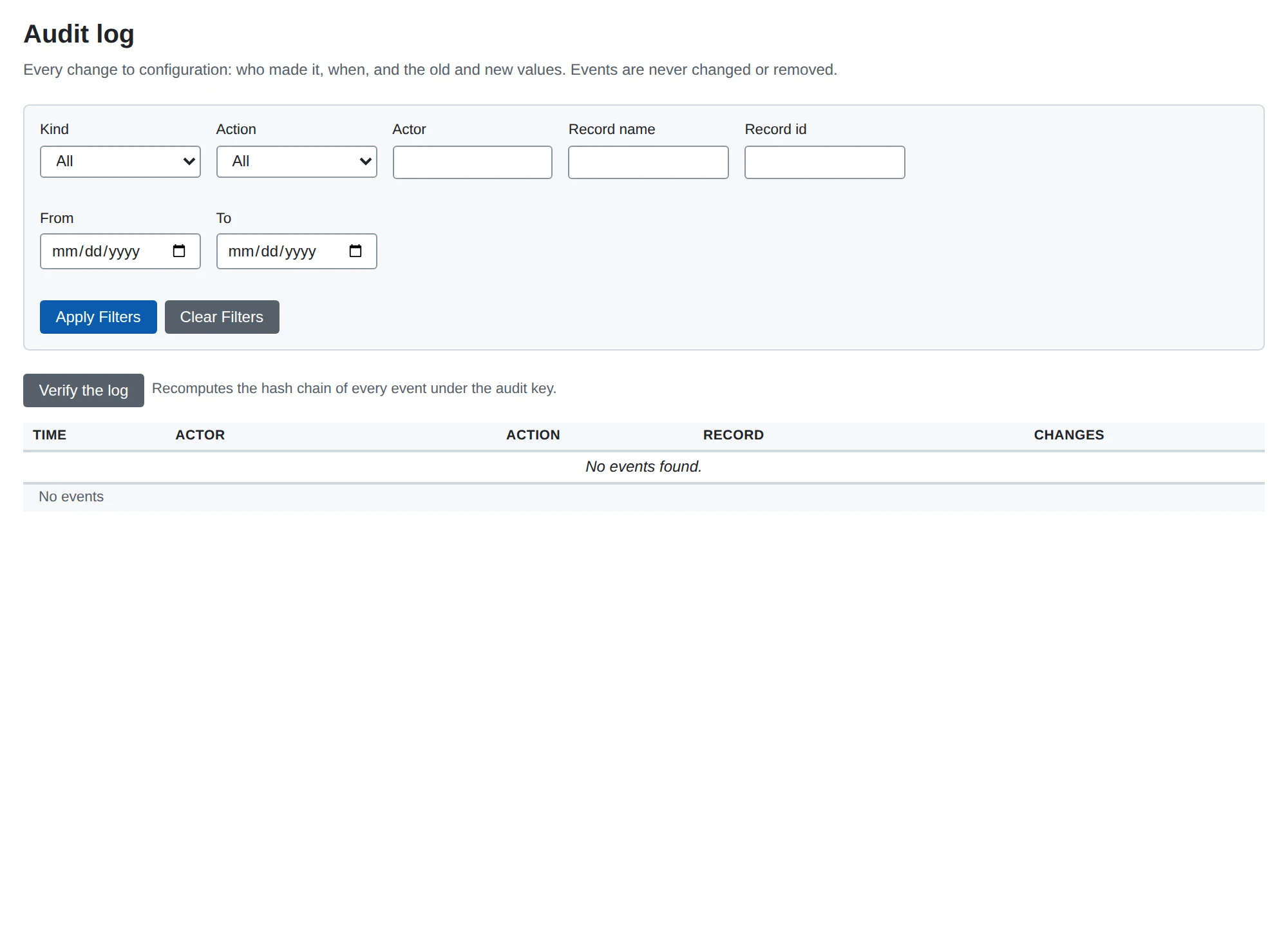
The log is read in the web UI under System > Audit log (filters for kind, action, actor, record and time; each record’s page links to the log filtered to it) and through GET /api/v1/audit (API reference).
Tamper evidence
With AUDIT_KEY (or AUDIT_KEY_FILE, exactly one of the two) the events form a hash chain: each carries hash, the HMAC-SHA256 under the key of the previous event’s hash followed by its own content in a fixed encoding, and prev_hash. The first hashed event has the zero hash as its prev_hash. Editing, removing or reordering an event breaks the chain from that event on, and the ids have no gaps, so a removed event shows too. The key is one deploy-time secret shared by the processes that write the log; there is no key store and no rotation, and changing the key makes the events written under the earlier one unverifiable, so keep it with the other secrets and do not replace it.
The key is optional. A process without it starts, still records every event, and computes no hashes; it logs a warning at startup that the log is not tamper-evident. Events recorded before a key was set are unchained and fine: the chain begins at the first hashed event. An unchained event after the chain began (the key was dropped) is reported as a break, because dropping the key would otherwise hide tampering. A key set or a configuration that is wrong (both variables, an unreadable file, fewer than 32 bytes, any other AUDIT_ variable) stops the start.
Verify recomputes the chain and names the first event that does not belong, and why (gap, prev_hash_mismatch, hash_mismatch, unknown_version, unchained_after_chain). It is one function behind three entry points:
microb2b audit verify                  # the database in DB_TYPE / DB_URL, with AUDIT_KEY
microb2b audit verify --file events.jsonl
the button on the Audit log page and POST /api/v1/audit/verify. The result counts the events checked (chained and unchained) and prints the head: the id and hash of the newest hashed event. A log with hashed events cannot be verified without the key.
This is tamper-evident, not tamper-proof. Whoever holds the database and the key can rewrite the log and recompute every hash; whoever holds only the database cannot. Removing the newest events leaves a valid chain, so truncation is detected only by comparing the head with one kept elsewhere: record the head id and hash that verify prints, somewhere the database’s administrators cannot change, and compare later. Signed external checkpoints are not part of the program.
Export
microb2b audit export [--out file] [--after-id N] writes the events, oldest first, as JSON lines (.jsonl, one object per line; --out creates a new file and never overwrites one). Export needs no key. A line holds exactly the fields the hash covers, plus the hashes:
| Field | Meaning |
|---|---|
v | Format version of the hashed encoding, 1. A program refuses a version it does not know |
id | Sequence number, from 1 without gaps |
at | UTC time, RFC 3339 with microseconds (2026-10-08T14:06:27.123456Z) |
actor, action, kind, record_id, record_name | Who, what happened (created, updated, deleted, started, stopped, restarted), the kind of record, its id and its name at that moment |
changes | Ordered list of {field, old, new, secret}; old and new are JSON values, absent for a create or a delete; secret: true carries no values |
prev_hash, hash | Hex; empty for an event recorded without a key |
microb2b audit verify --file recomputes the chain over the lines with the local AUDIT_KEY. A file that starts at event 1 is verified from the start of the log. A file that starts later is verified from its first line as given: that proves its lines chain with one another under the key, not that they continue the log or that nothing follows them. Pin the start with --after-id N --after-hash H (the id and hash of the event before the first line) to prove the file continues from a known event.
Logs, health and metrics
Logs go to standard error as key=value text. The Logs page of the web UI follows them live: each process publishes its lines on the message bus and the API server keeps the latest 2000 lines (2 MiB) in memory, so the page shows nothing from before the server started. It filters by level, text and message id, and in distributed mode also by process. Everyone who can open the UI can read the lines. Lines about a message carry its message_id.
Health. GET /health on the API server answers 200 {"status":"healthy","timestamp":...,"database":"up"}, or 503 with "status":"unhealthy","database":"down" when the database does not answer a ping. It names no version. It is the endpoint for a load balancer or orchestrator probe. AS2 receivers have no health endpoint; a probe for one can only check that the port accepts connections (a GET on the AS2 path answers 405).
Alerts. Anything that needs a person’s attention is raised as an alert event on the message bus (subject events.alert), by whichever process knows about it, so no one has to read logs for it: a message reaching status Error (message_failed), a message that matched no route (message_not_routed), an asynchronous MDN that failed for good (async_mdn_failed), a file moved to unroutable/ (file_unroutable), a plugin that could not be started (plugin_failed) and an expired or expiring certificate (certificate_expired, certificate_expiring). Each event carries a severity, a one-line summary, short details (never a payload, a secret or a URL) and a path to the page about it. A webhook notifier subscribes to the subject and posts them to Slack or to any receiver. The certificate monitor scans hourly but alerts once per certificate and state per 24 hours; it keeps that in memory, so after a restart a certificate that is still expiring is alerted about once more. An alert is never held back by a slow bus: each process queues up to 256 and drops the newest beyond that, logging alerts dropped with the count.
Telemetry. With OTEL_ENABLED=true each process exports traces, metrics and logs over OTLP gRPC, describing itself by service, host, process and Go runtime.
Traces. A message’s trace begins where it came in: the AS2 receiver’s HTTP request (as2.receive_message) or the file poller (file.dispatch_file). The dispatch stores the trace on each delivery it creates (and an AS2 receiver on each asynchronous MDN it queues), so every wake-up of the delivery (the dispatch’s, the sweep’s, an operator’s redeliver), its claim and every attempt (delivery.attempt, with the target’s outgoing HTTP request) join that trace, in whichever process and however long after; a delivery an operator’s redispatch adds is in the trace of that request. Trace context crosses NATS in message headers. The spans are the HTTP server’s requests (API server and AS2 receivers; never the query string or a header, and not static assets, /health or event streams), outgoing HTTP requests (AS2 sender, asynchronous MDNs, HTTP poster, notifier: <method> <host[:port]>, with the method, the origin (scheme, host, port; also as url.template, which a backend names the span by) and the status, never the path or query, which may be a credential), database queries (<operation> <table>, never the statement or a value), NATS publish, receive, request and respond, and the module’s own steps. Only work within a trace records spans: background traffic (the log tail, alerts, live page updates, polls, the sweep’s passes) makes no traces. An asynchronous receipt arrives in a trace of its own (the partner’s request); its delivery.settle span links to the delivery’s trace. A request’s incoming traceparent (a partner’s, a browser’s) is a link of the request’s trace, never its parent, and no trace context is sent to a partner or a webhook.
Logs. Every line the process logs at or above LOG_STREAM_LEVEL (the lines its Logs page shows; never below LOG_LEVEL) is also exported as an OpenTelemetry log record, with its attributes (message_id, delivery_id and user among them) and the trace and span of the work it was logged in, so a backend shows a message’s log lines beside its trace. The process still writes every line to standard error as before. Values are exported as logged, without redaction, exactly as the Logs page shows them: a masked secret type shows its mask, and anything else sensitive is never logged.
Metrics. Besides MicroB2B’s own (below), the Go runtime’s (go.memory.*, go.goroutine.count, go.processor.limit, go.config.gogc, …), http.server.request.duration and http.client.request.duration, and the database connection pool (db.client.connection.count by state idle/used, .max, .wait_count, .wait_time). MicroB2B’s own are microb2b_messages_total, microb2b_message_processing_duration_seconds and microb2b_message_size_bytes (attributes protocol (the module: as2, file, httppost) and status, nothing more: the metrics describe the server as a whole, not each trading pair, whose messages are found by their traces; recorded per message by the AS2 receiver and sender, the file poller and writer and the HTTP poster, with status success or error (the receiver records error for a message it answered with a failed receipt); the HTTP poster records every POST attempt) microb2b_certificates_expiry (state is expired or expiring), and microb2b_inbound_requests_in_flight and microb2b_inbound_requests_refused_total (attributes protocol and instance: the requests a receiver instance is handling under its concurrency cap, and those it refused with 503 at the cap; see AS2 concurrent requests), and the delivery counters microb2b_delivery_transitions_total (state: the state a delivery entered), microb2b_delivery_wakeups_total (source: dispatch, sweep, action or catch_up), microb2b_delivery_wakeups_failed_total (wake-ups that could not be published) and microb2b_delivery_claim_conflicts_total (target: wake-ups whose delivery another claimant already held; a few are normal), and the sweep’s microb2b_deliveries (gauge, state: deliveries in each state as of the last pass, every state present), microb2b_deliveries_due (gauge: queued and retrying deliveries whose time has come; it stays near zero while the targets keep up) and microb2b_deliveries_stalled_total (target: deliveries stalled because the target never claimed them; alert on it). Every histogram (MicroB2B’s, the HTTP server’s and client’s) is a base-2 exponential histogram, whose buckets follow the values recorded, so a percentile is as precise for milliseconds as for minutes and for kilobytes as for gigabytes; a backend or collector that takes only explicit-bucket histograms cannot read them. The sweep runs in the process that owns the database (the standalone process, or the persistence process), every 5 seconds, and is silent in the log unless a delivery stalls or a lease expires. otel-collector-config.yaml is a collector setup that forwards traces to Jaeger and exposes metrics for Prometheus on port 8889, and docker-compose.yml runs it (Jaeger UI on 16686).
Load testing
just test-load makes MicroB2B test against itself: it builds the developer binary and runs two standalone instances on one machine, A (file poller, AS2 sender) and B (AS2 receiver, file writer), each in a scratch directory of its own with its own database (a SQLite file, or a PostgreSQL database with -postgres), API port and receiver port (free ports, chosen per phase). Nothing it starts touches another running instance. test/selftest-load holds the tool; flags follow the recipe, for example just test-load -n 2000 -size-kib 100 -profiles secure,async.
| Flag | Default | Meaning |
|---|---|---|
-n | 500 | Messages (files) per profile |
-size-kib | 10 | Payload size; the content is random, so compression cannot flatter the result |
-profiles | plain,signed,secure,async | Protection profiles, each a phase on a fresh pair of instances (below) |
-sender-concurrency | module default | A’s max_concurrent_deliveries |
-receiver-concurrency | module default | B’s max_concurrent_requests |
-poll-interval | 1 | A’s poller interval in seconds |
-sigterm-after | off | Send SIGTERM to the sending process A once this many messages are Delivered on it, with a backlog still to go, and start it again on its database (below) |
-scaling | off | After the profiles, run the first one with A’s max_concurrent_deliveries at 1 and at 8 and fail when 8 is clearly slower (below 0.7 of the serial rate) |
-timeout | 10m | Longest a phase may take |
-profile | off | Start both instances with --pprof, profile them during the run and print the top functions (below); implies -keep |
-postgres | off (SQLite) | URL of a PostgreSQL server whose user may create databases, for example postgres://postgres:secret@127.0.0.1:5432/postgres?sslmode=disable; each instance of each phase gets the database selftest_<profile>_<a|b> on it, dropped and created when the phase starts and left behind afterwards |
-keep, -workdir | Keep the scratch directory (databases, logs, payloads), or create phases in a directory of your choice |
The profiles: plain (no signature, encryption, compression or MDN), signed (SHA-256 signature, synchronous signed MDN), secure (compressed, AES-256-CBC, SHA-256 signature, synchronous signed MDN) and async (SHA-256 signature, asynchronous signed MDN). Each side has a self-signed certificate with a private key, loaded with a fixture.
A phase stages all files in A’s outbox/<partner>/ before A starts, so the poller’s first scan queues them at once and the measured rate is not bounded by the poll interval. It waits until A holds every message as Delivered and B’s writer has written every file, then stops both processes with SIGTERM and judges the run from the two databases and B’s output directory: exactly one Delivered message per file on A, exactly one message per file on B, none in Error, exactly one output file per input and every output file byte for byte (SHA-256) the original. Any mismatch is listed and the exit status is non-zero.
With -sigterm-after N, A is stopped with SIGTERM as soon as N messages are Delivered on it while the rest are still queued, in flight or in the outbox; it is started again on the same database and directories (no reset, no fixture) and the phase carries on. The run fails unless the stop left no delivery failed, there was a backlog to interrupt, A exited cleanly, and every staged file ends as exactly one Delivered message on A and one Delivered (written) message on B with B’s output equal to the input. B’s rows for a resend it recognized as a repeat of an accepted message (Repeat of message ...) are counted and reported, not mixed with the messages its writer saw; the writer never gets a Message-ID twice. just test-load -n 300 -profiles secure -sigterm-after 60 is the short form.
Reported per phase: wall time from the first file queued to everything delivered and written, messages and MiB per second, the time to 50% and 90% delivered, the per-message time from the poller queuing a file to the sender’s POST (and a synchronous MDN) completing, the sender’s own HTTP exchange time and the time to B’s written file (percentiles), peak resident memory and CPU time of each process from /proc, and the WARN and ERROR lines of both logs by message (the developer build’s startup banner is excluded). Per-message times come from the log lines, which carry milliseconds; the database stores timestamps to the second. Delivery of an asynchronous MDN is not logged, so for async the Delivered moment is the run’s own observation of the message count through the REST API (polled every 100 ms).
Profiling
The developer build serves pprof profiles on request: microb2b standalone --pprof 127.0.0.1:6060 (also on persistence) starts a listener of its own that serves /debug/pprof/ (profile?seconds=N for CPU, heap, allocs, goroutine, mutex, block, trace). It is not on the API server, it accepts a loopback IP address only (a host name or any other address stops the start with an error), and without the flag nothing listens. The flag also turns on mutex and block sampling, which a normal run leaves off. A release build has no such flag. For example go tool pprof -top -cum http://127.0.0.1:6060/debug/pprof/profile?seconds=10.
just test-load -profile does this for both instances of the load test. During the run it takes one-second CPU profiles back to back from each instance, with a goroutine summary after each; at the end it takes heap, allocs, mutex and block profiles. They are written to <scratch>/<profile>/{a,b}/profiles (cpu-NNN.pb.gz, goroutines-NNN.txt, heap.pb.gz, …) and the report prints the top 25 functions by flat and by cumulative CPU, the mutex and block delay the run added, and allocated and in-use memory. go tool pprof -top target/microb2b <dir>/cpu-*.pb.gz merges the CPU chunks.
Backup
Back up the database and the payloads together: the database records which payload stages a message has, the payload storage holds their bytes (see storage). Keep SECRETS_KEY (and any previous key a stored value may still name) backed up apart from them: without it the private keys and secrets in a backup cannot be used.
- SQLite:
sqlite3 microb2b.db ".backup /backup/microb2b.db"works while MicroB2B runs. A plain file copy needs MicroB2B stopped, or the-waland-shmfiles copied with it. - PostgreSQL:
pg_dump -F c. - Payloads: copy the storage directory, or use bucket versioning or replication for S3.
Upgrading
- Back up the database.
- Stop MicroB2B (distributed: all processes), replace the binary or image, and start it again (distributed:
persistencefirst). - Check
/healthand the log.
To roll back, stop, restore the database backup and start the previous version.